
SEO (Search Engine Optimization) is the process of improving a website so it ranks higher in search engine results pages, like Google, without paying for ads. When your pages rank higher for relevant searches, more people find and click on your website, which usually means more traffic, leads, or sales.
If you run a blog, a small business site, or an online store, SEO is one of the few marketing channels that keeps working for you long after you publish. A well-optimized article can bring visitors for years, while a paid ad stops the moment you stop paying.
How Do Search Engines Work?
Search engines like Google use three basic steps to show you results:
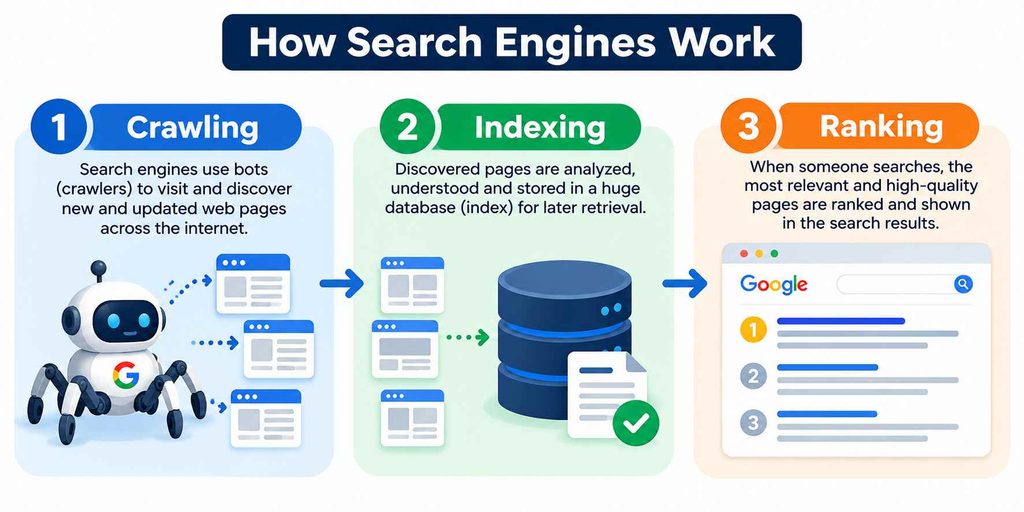
- Crawling: Automated bots (called crawlers or spiders) scan the web and discover pages.
- Indexing: The search engine stores and organizes the content of those pages in a massive database.
- Ranking: When someone searches, the engine pulls the most relevant, high-quality pages from its index and orders them by relevance and authority.
SEO is about making each of these three steps easier and more favorable for your website.
Why SEO Matters for Your Website
Most online experiences start with a search engine. If your site doesn’t show up on the first page, you’re likely missing the majority of potential visitors, since very few people click past page one.
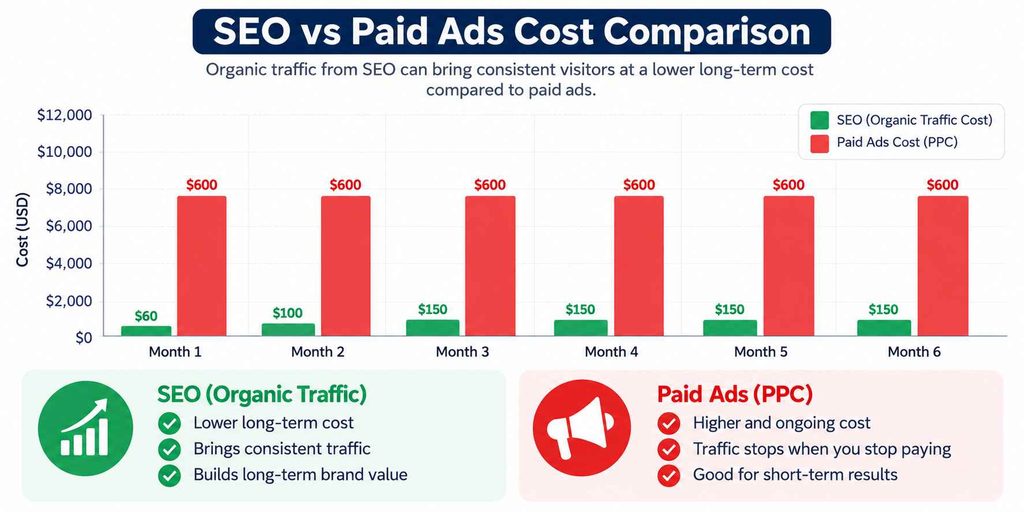
Here’s a simple example. Say you run an online tool site and one of your calculator pages gets ranked in the top 3 for a keyword searched 10,000 times a month. Even at a modest 3% click-through rate, that’s around 300 visitors a month from a single page, at zero ad spend. Compare that to running ads for the same traffic, which could easily cost ₹15,000 to ₹30,000 a month depending on competition. That’s the core value of SEO: compounding, free traffic over time.
The Main Types of SEO
SEO is usually broken into three categories. Each one covers a different part of getting your site to rank.
1. On-Page SEO
This covers everything you control directly on your web pages:
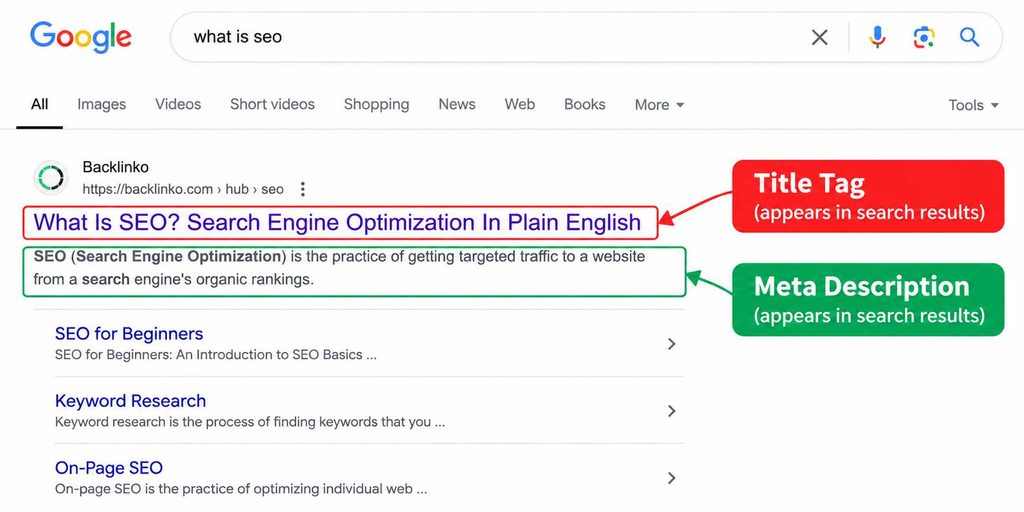
- Title tags and meta descriptions
- Header structure (H1, H2, H3)
- Keyword placement in content
- Internal linking
- Image alt text
- Content quality and length
2. Off-Page SEO
This covers signals from outside your website that build trust and authority:
- Backlinks from other websites
- Brand mentions
- Social signals
- Guest posting and PR
3. Technical SEO
This covers how well search engines can crawl and read your site:
- Site speed
- Mobile-friendliness
- Secure connection (HTTPS)
- XML sitemaps
- Fixing broken links and crawl errors
On-Page vs Off-Page vs Technical SEO
| SEO Type | What It Controls | Example Actions | Difficulty |
|---|---|---|---|
| On-Page | Content and structure on your site | Writing keyword-focused titles, adding headers | Easy to moderate |
| Off-Page | External trust signals | Getting backlinks, PR mentions | Moderate to hard |
| Technical | Site health and crawlability | Fixing site speed, adding sitemaps | Moderate |
How to Start Doing SEO: Step-by-Step
If you’re completely new to SEO, here’s a practical starting sequence.
- Pick a primary keyword for each page. Use a keyword tool to find what your audience actually searches for, and check the search volume and competition before committing.
- Write content that matches search intent. If people searching your keyword want a definition, give them one in the first two lines. If they want a how-to, structure your content as steps.
- Optimize your title and meta description. Keep your title under 60 to 65 characters and put your main keyword near the front. Optimize your own, or you can use a free meta description generator tool.
- Structure your content with headers. Use one H1 per page, and break the body into H2 and H3 sections so both readers and search engines can scan it easily.
- Add internal links. Link to related pages on your own site using natural anchor text, not forced keyword stuffing.
- Improve page speed and mobile view. A slow or broken mobile layout will hurt rankings even if your content is great.
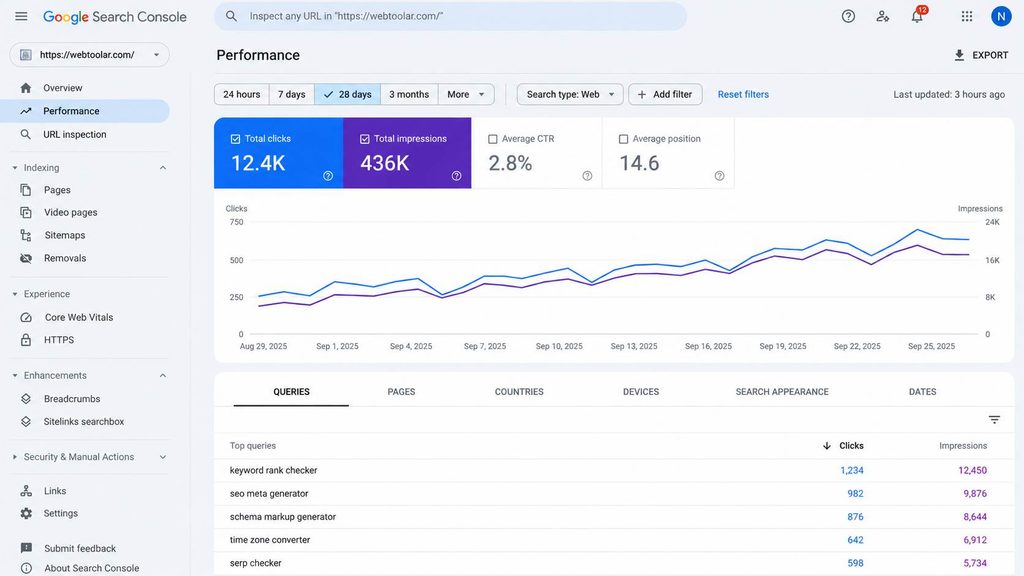
- Track your results. Use Google Search Console to see which keywords bring impressions and clicks, then refine pages that are close to ranking but not quite there.
In practice, the pages that improve fastest are usually the ones already sitting on page 2 (positions 11 to 20). A small update, like adding an FAQ section or fixing the title tag, can push them onto page 1 within a few weeks.
Common SEO Mistakes Beginners Make
- Targeting keywords with no real search volume
- Writing content for search engines instead of readers
- Ignoring page speed and mobile experience
- Skipping internal linking between related pages
- Expecting results in days instead of months
SEO is a long-term game. Most new pages take 3 to 6 months to see meaningful ranking movement, especially on a newer website with limited authority.
SEO Related FAQ
What does SEO stand for?
SEO stands for Search Engine Optimization. It’s the practice of improving your website so it appears higher in unpaid search results.
How long does SEO take to show results?
Most websites start seeing noticeable movement in 3 to 6 months, though highly competitive keywords can take longer. Results depend on your site’s existing authority and competition level.
Is SEO free?
The traffic you earn through SEO is free, meaning you don’t pay per click. However, SEO does require time, content creation, and sometimes tools or hired help, so it has an indirect cost.
What is the difference between SEO and SEM?
SEO focuses on unpaid, organic rankings, while SEM (Search Engine Marketing) includes paid ads on search engines. Many businesses use both together.
Do I need to hire an SEO expert?
Not necessarily. Beginners can handle basic on-page SEO themselves using free tools like Google Search Console and Google Keyword Planner. Hiring help becomes more useful for technical fixes or competitive niches.